Random House DRM-free a hoax?

While it seems many are rejoicing over the supposed announcement of Random House going DRM-free, it also seems this could be hoax. BoingBoing, care of Cory Doctorow, brought the story to light. But something doesn’t smell right…

Don’t get me wrong – this would be groundbreaking and very fast for an industry that doesn’t usually take big risks. But there’s a lot bordering on the edge of too-good-to-be-true and not sitting right.

Cory Doctorow broke the story on BoingBoing.net, where he claims to have gotten hold of an announcement. The announcement isn’t available anywhere else on the net.

The content of the letter is downright mouth watering for folks looking forward to DRM-free content.

“The results: we have not yet found a single instance of the eMusic watermarked titles being distributed illegally.”

Seriously? Not a single one? Were there no sales? There will be piracy with any content. Everyone expects this. The issue is not whether it will happen or not, but whether DRM-free content leads to increased sales, increased profits, and increased customer love. The statement that not a single instance occurring is hard to swallow.

I’m not saying it’s a hoax – only that I’m looking forward to getting more facts and seeing how this plays out. I’ve written to Random House for comment but have not yet received a response.

UPDATE: Madeline McIntosh, Random House publisher and author of the letter, confirmed this morning via email that the letter is not a hoax (also confirmed in the comments below). This is exciting and game changing news in the audiobook industry.

RESTful Documentation

iofy

As promised (but late as a post), we released iofy’s RESTful documentation. This is extremely exciting for both our development and management teams. We now have an open account management API enabling others to offer iofy’s account management and access to a customer’s digital libraries of downloaded audiobooks.

I’m proud of this accomplishment.

The iofy RESTful API covers the features for partner or reseller to offer downloadable audiobooks. These RESTful web services use standard REST calls, are language agnostic, retrieve RSS 2.0 feeds and enable:

  • product listing and search
  • account management
  • financial management
  • purchase and checkout

One can receive dynamic product feeds from ws.iofy.com/product/, where search parameters can include title, author, publisher, narrator, ISBN, and more. These feeds come complete with thumbnail image enclosures, MP3 audio sample enclosures, and all the metadata.

Via account management, described last week, customer accounts can be created, modified, password reset, and most importantly the customer’s prior purchases become available in a library. One can offer this digital library and account management solution without building it (or maintaining it). Just harness it.

The fulfillment API allows assignment of a digital download in a single call. We included PHP sample source code, but it could just as easily be harnessed in any other language.

JavaScript and PHP sample code is available which allows complete harnessing of both APIs. To learn more, email developer@iofy.com.

iofy td: RESTful API
iofy td: Fulfillment API

Windows XP better as a VM than Vista – Duh

Vistato XP

After reading this great, hilarious, post on upgrading to XP (yes, you read that right – this isn’t a Vista upgrade), I decided to take the plunge. I’ve been punished long enough for using Vista Ultimate in my VMware environment and portable laptop. It’s been a nice OS, but performance is in the toilet and I can’t take it any more.

It’ll hang around for testing purposes… Here’s hoping SP1 brings some hope to Vista.

The Mac/PC dev/QA environment

 Mac/PC Dev Environment

Developing PC applications on the Mac is great, contrary to what some believe. I too was once in the ‘build-on-the-platform-you-target’ camp. Forget that horse-puckie and get efficient:

  1. Get VMware Fusion: http://www.vmware.com/products/fusion/.
  2. Make sure you’ve got XCode. This will be sixty percent of your development environment and you’ll be coding in OS X.
  3. Install Windows XP or Vista, your choice, as a new VM in Fusion. This will be the other forty percent of your development environment where you’ll step code and delve out builds. Don’t set it up with more than 40% of your Mac’s RAM assigned (preferably 25%).
  4. Install your development tools on this Windows instance, probably .NET 2005.
  5. Set up a shared folder for your source code between your Mac user folder and the dev VM. Make it read-write by both systems (a setting in Fusion).
  6. Set up more VMs in Fusion. These are your Test VMs (smaller, fast Windows instances used as QA machines) – as of this writing you should make XP Home, XP Pro, Vista Home, and Vista Ultimate VMs. You may want additional setups depending on your apps needs (administrator settings, etc). Set these up with 25% or less of your available RAM.
  7. Do nothing… I’m waiting for you to finish step 6… It takes a while.
  8. Run Windows Update (if desired) and take Snapshots of each VM (Command+T) after they’re set up. These Snapshots will let you revert to a clean state any time you wish.

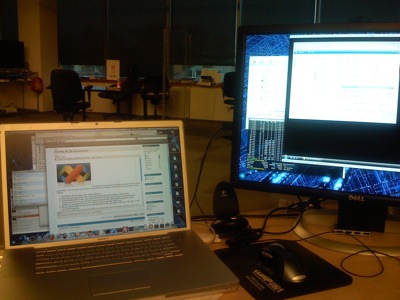
Great, now you’re hooked up and can get your code on. With XCode you can utilize all your monitors (if you’re a developer using less than 2 monitors, we need to talk…). You’ll have XCode running with your source code all over the place organized how you like it. You’ll have your development VM running in a corner.

Use XCode as the code editor (you’ve got your source files saved on the Mac, in the shared folder). Keep the development VM running and hit Control+B in it (or better yet, add an AppleScript to XCode to pass Control+B to the VM) when you need a new build. You can step through the code when you need to.

When you’re ready to test your app(s) on all flavors of Windows, launch up the various VMs and install the app(s). Afterwards, restore to the Snapshot you took before. You’re starting from a nice clean start every time.